Most businesses still have someone manually answering the same ten questions every single day. “What are your hours?” “Can I book an appointment?” “Is someone available to talk?” It is repetitive, it costs money, and customers often wait longer than they should.
AI voice receptionists are changing that. Not by replacing your team — but by handling the volume of routine calls so your team can focus on work that actually needs a human.
This guide covers what these systems are, where they fit in real businesses, how they are built technically, and what development actually costs. No fluff, no filler.
What Is an AI Voice Receptionist?
An AI voice receptionist is a software system that answers phone calls, understands what callers are saying, and responds in natural spoken language — without a human on the other end. It can handle appointment scheduling, FAQs, call routing, lead qualification, and more.
Unlike old-school IVR systems where you press 1 for billing and 2 for support, modern AI voice receptionists hold actual conversations. They understand context, follow up within the same call, and hand off to a human agent when needed — with a full summary of what was discussed.
The underlying technology has matured a lot over the last two to three years. Natural language understanding is sharper, voice synthesis sounds closer to human speech, and integrations with CRMs, scheduling tools, and support platforms have become much more straightforward to build.
Business Use Cases That Actually Work
The strongest results come from deploying AI voice receptionists in scenarios with high call volume, predictable conversation paths, and clear outcomes. Here are the use cases where businesses are seeing real ROI today.
Healthcare Clinics and Private Practices
Medical offices deal with a constant stream of calls for appointment booking, cancellations, prescription refill requests, and location questions. An AI receptionist handles all of this 24/7, syncs with scheduling software like Calendly or custom EHR systems, and escalates urgent calls to on-call staff immediately. Front-desk teams spend less time on the phone and more time with patients in the room.
Law Firms and Legal Services
Potential clients call law firms at all hours after an accident, a dispute, or a notice in the mail. Missing those calls often means losing that client. An AI receptionist can take initial intake information, qualify the lead based on practice area, schedule a consultation, and pass a detailed summary to the attorney — all before the office opens the next morning.
Real Estate Agencies
Property inquiries come in constantly across listings, and agents cannot be available for every call. AI voice receptionists answer questions about specific properties, collect buyer or renter details, qualify interest level, and book viewings — without an agent needing to pick up the phone.
E-Commerce and Retail Customer Support
Order status, return policies, delivery windows, stock questions — these are the same calls, repeated hundreds of times a day. An AI receptionist connected to your order management system can handle all of these instantly, escalating only when there is a real problem that needs human judgment.
Home Services and Tradespeople
Plumbers, electricians, HVAC companies, and cleaning services are often out on jobs when clients call to book. An AI receptionist answers those calls, asks qualifying questions about the job, checks availability on the calendar, and confirms the booking — so no leads slip through while the team is working.
Hospitality and Restaurant Reservations
Restaurants fielding reservation calls, dietary questions, and event inquiries during service hours are particularly well-suited for AI voice solutions. The receptionist handles reservations, confirms bookings, and answers common questions, freeing staff to focus on guests already at the table.
Technology Architecture: What’s Under the Hood
Understanding the tech stack helps you make better decisions when working with a development team. An AI voice receptionist is not a single tool — it is a pipeline of components working together in real time.
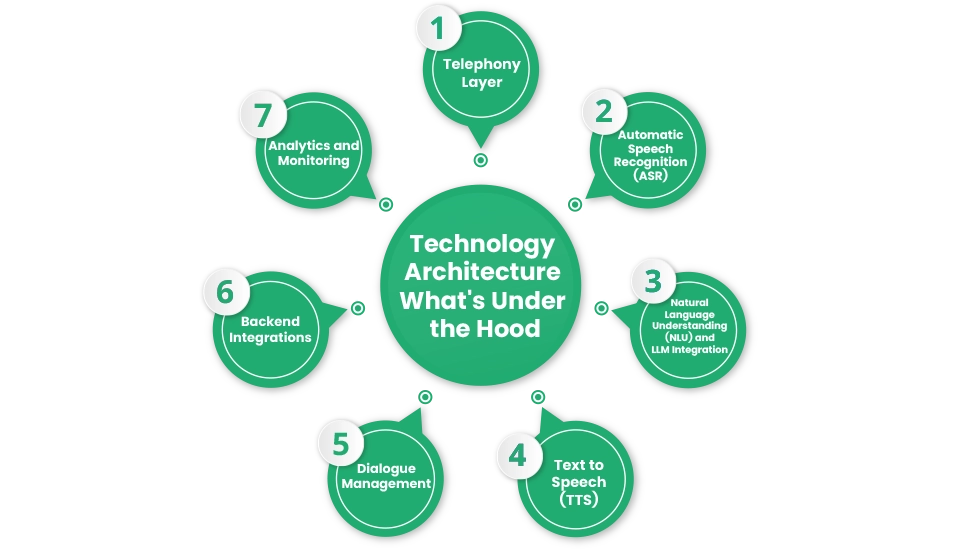
1. Telephony Layer
This is the bridge between a regular phone call and the software that processes it. Platforms like Twilio, Vonage, and Plivo are commonly used here. They handle call routing, SIP connections, and the audio stream that gets passed along to the AI components. Your business keeps the same phone number — the system works behind it.
2. Automatic Speech Recognition (ASR)
ASR converts the caller’s spoken words into text in real time. The quality of this component directly affects accuracy — especially for accents, technical terminology, and noisy call environments. Commonly used ASR engines include Google Speech-to-Text, AWS Transcribe, Deepgram, and AssemblyAI. For industry-specific vocabulary (medical terms, legal language, product names), the model is often fine-tuned to improve recognition.
3. Natural Language Understanding (NLU) and LLM Integration
Once speech is converted to text, the system needs to understand what the caller actually wants. This is where large language models (LLMs) like GPT-4, Claude, or fine-tuned open-source models come in. The LLM processes the text, identifies intent, manages the conversation context, and decides what response makes sense — whether that is answering a question, collecting information, or routing the call.
4. Text-to-Speech (TTS)
The AI’s response is converted back into natural-sounding speech using TTS engines. ElevenLabs, Google Cloud TTS, and OpenAI’s TTS are popular choices. Voice selection and tone are customizable — your AI receptionist can sound consistent with your brand identity, and the voice can be given a name that makes sense for your business.
5. Dialogue Management
This is the logic layer that keeps the conversation on track. It handles multi-turn conversations, remembers what was said earlier in the call, manages fallbacks when the AI is unsure, and decides when to transfer to a human agent. This component is often the most custom-built part of any AI voice receptionist project.
6. Backend Integrations
A voice receptionist that cannot actually do anything is just a more expensive voicemail. The real value comes from integrating with the tools your business already uses — CRMs like Salesforce or HubSpot, scheduling platforms, ticketing systems like Zendesk, and internal databases. These integrations let the AI check real data, create records, update bookings, and trigger workflows during the call.
7. Analytics and Monitoring
Every call generates data. Good deployments include dashboards tracking call volume, completion rates, escalation frequency, and common topics. This feedback loop is essential for improving the system over time and identifying where conversations are breaking down.
How Much Does AI Voice Receptionist Development Cost?
Cost depends heavily on complexity, the number of integrations, and whether you are building from scratch or layering on top of existing platforms. Here is an honest breakdown.
Simple Deployment (Using Off-the-Shelf Platforms)
If your use case is straightforward — answering FAQs, capturing leads, basic appointment booking — you can often start with platforms like Bland AI, Vapi, or Retell AI and configure them without deep custom development. Setup costs in this range typically fall between $5,000 and $20,000 depending on the configuration complexity and any custom integrations needed. Monthly platform fees usually range from $200 to $1,000+ depending on call volume.
Mid-Complexity Custom Build
If you need multiple conversation flows, CRM or EHR integrations, custom voice, brand-specific logic, and a proper testing and QA process, expect development costs in the $25,000 to $60,000 range. This covers architecture, development, integration, testing, and a launch-ready deployment.
Enterprise-Grade System
Large organizations with high call volumes, compliance requirements (HIPAA, GDPR), multilingual support, complex routing logic, and deep enterprise integrations are looking at $80,000 to $200,000+ for a full build. Ongoing maintenance, model retraining, and support contracts add to the annual cost.
Ongoing Costs to Plan For
Beyond development, factor in monthly API costs for your LLM and TTS providers (these scale with call volume), telephony fees, cloud hosting, and regular system updates as your business needs change. A well-built system should get more accurate over time, not require constant rebuilds.
The honest answer is that most businesses see a positive return within 6 to 12 months when deployed in the right use cases — particularly where call volume is high and the cost of missed calls or front-desk overhead is significant.
Key Features Worth Building Into Your System
Not every AI voice receptionist needs every feature on day one, but these are the capabilities that separate systems that actually work from ones that frustrate callers.
- Natural interruption handling — Callers should be able to speak mid-response without the system getting confused or repeating itself.
- Graceful human handoff — When the AI reaches the edge of its ability, it transfers to a human agent with context from the conversation, not just a cold transfer.
- Multilingual support — If your customer base speaks multiple languages, this needs to be built in from the start, not patched in later.
- Call recording and transcription — Every call becomes a searchable record. Useful for QA, compliance, and training your future models.
- Sentiment detection — The system recognizes when a caller is frustrated and adjusts — either changing its approach or escalating faster.
- Fallback and error handling — Clear logic for when the AI genuinely does not understand something, rather than looping or giving confusing responses.
What to Look for in a Development Partner
Building an AI voice receptionist is not a plug-and-play project. The team you work with matters. Here is what separates good partners from ones who will deliver a demo that breaks in production.
Look for teams with direct experience building voice AI systems — not just chatbots or web apps with an AI wrapper. Voice conversations have real-time latency requirements, audio quality constraints, and edge cases (background noise, dropped words, ambiguous intent) that text-based AI work simply does not prepare a team for.
Ask to see real deployments. Not concept videos — actual systems in production, with metrics on how they are performing. Ask about how they handle model updates, what happens when an API provider has an outage, and how they test conversation flows before going live.
At Zenkoders, we build AI voice systems that are designed for real business environments — not just demos that look good in a meeting. If you have a specific use case in mind, we are happy to talk through what a build would actually look like for your business.
FAQs:
How long does it take to build an AI voice receptionist?
A simple deployment on an existing platform can be live in 2 to 4 weeks. A mid-complexity custom build typically takes 8 to 16 weeks from kickoff to launch, including integration, testing, and refinement. Enterprise builds with complex requirements can run 4 to 8 months.
Can the AI voice receptionist work with my existing phone number?
Yes. In most deployments, your existing business number stays the same. The AI system works behind it through telephony APIs that route calls to the AI before deciding whether to handle them automatically or pass them to a human.
What happens when the AI does not understand a caller?
A well-built system has clear fallback logic. The AI will ask for clarification once or twice, and if it still cannot confidently handle the request, it transfers the call to a human agent with a summary of what was discussed so far. The caller should never feel stuck in a loop.
Is it HIPAA-compliant for healthcare use?
It can be, but compliance needs to be designed in from the start — not added later. This includes choosing HIPAA-eligible infrastructure, data handling agreements with API providers, proper call recording and retention policies, and audit logging. If you are in healthcare, make sure your development partner has built for HIPAA before.
How much does it cost to run monthly after launch?
Ongoing costs depend on call volume and the providers you use. A typical small business deployment (a few hundred calls per month) might run $300 to $1,500/month in combined platform and API fees. Higher-volume operations scale accordingly. These costs are almost always well below the cost of a full-time receptionist.
Can it handle multiple languages?
Yes — multilingual support is a standard capability in most AI voice platforms and can be implemented in custom builds. The main consideration is that each language needs proper testing and may need separate tuning for accuracy, especially with industry-specific terminology.
Will callers know they are talking to an AI?
This depends on your preference and your jurisdiction’s legal requirements. In many regions, you are required to disclose that the caller is interacting with an automated system. Many businesses choose to be upfront about it regardless — transparency tends to work better than trying to pass the AI off as a human, and callers generally respond fine when the system is helpful and accurate.