
Successful software development involves much more than writing code.
A product can have skilled developers and still run into trouble when its requirements are unclear, technical risks are discovered too late, responsibilities are poorly defined, or the team builds features users do not actually need.
The Software Development Life Cycle, commonly known as the SDLC, provides a structured way to plan, design, build, test, deploy, and maintain software.
It does not require every project to follow a rigid sequence. Agile, Waterfall, DevOps, Spiral, and other development approaches organize work differently. However, they all need to answer the same fundamental questions:
What problem are we solving? What should the system do? How will it be designed and built? How will the team verify that it works? How will it be released safely? Who will maintain it after launch?
This guide explains the seven common phases of the software development life cycle, the deliverables produced during each phase, popular SDLC models, security practices, team responsibilities, and common mistakes to avoid.
What Is the Software Development Life Cycle?
The Software Development Life Cycle is a structured process used to guide a software product from its initial idea through development, release, maintenance, and eventual retirement.
An SDLC framework helps teams organize decisions, define responsibilities, manage risk, and maintain quality throughout the project.
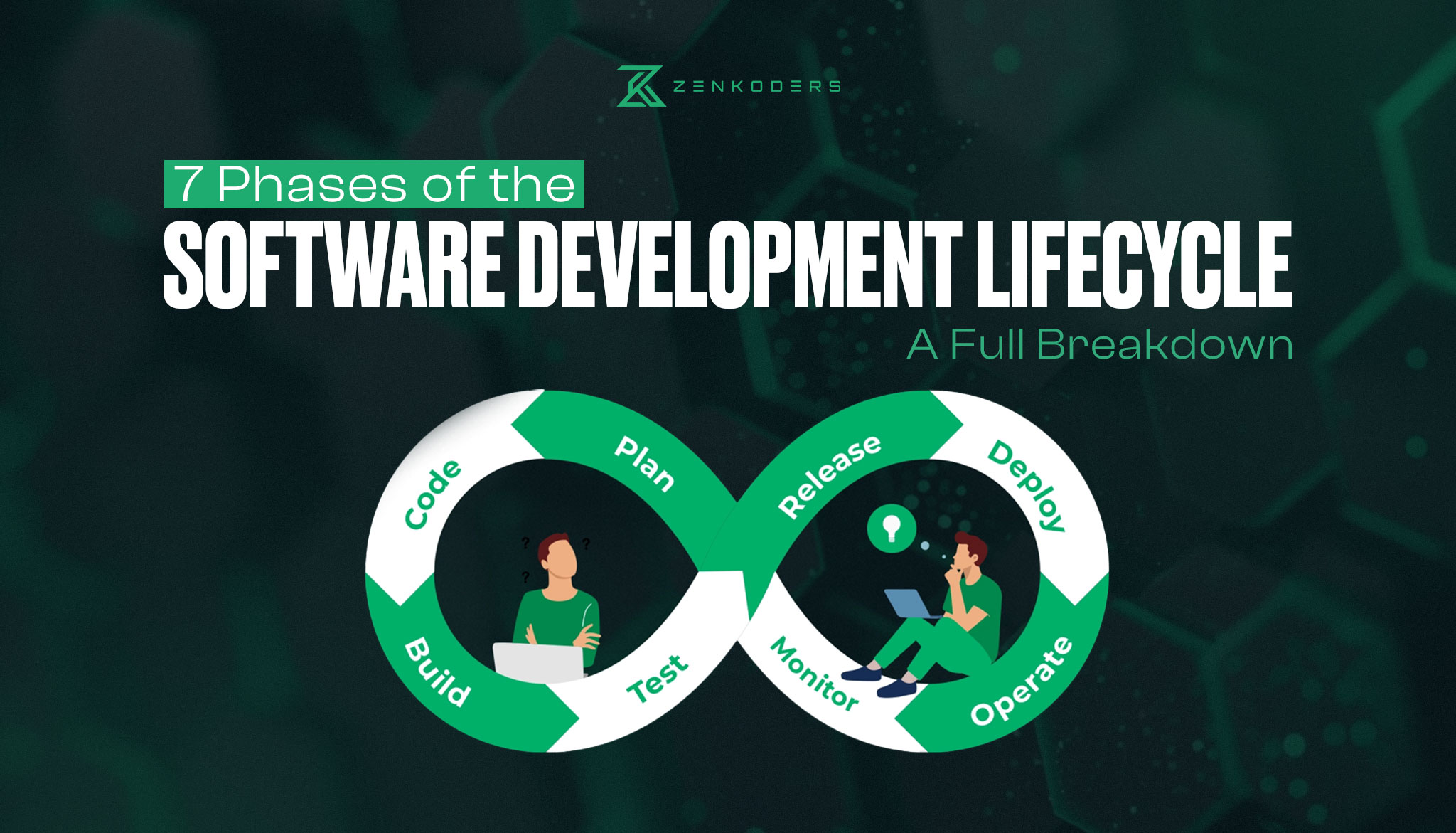
A typical software development life cycle covers seven broad phases:
- Planning
- Requirements analysis
- System design
- Development
- Testing
- Deployment
- Maintenance and improvement
The names and boundaries of these phases can vary between organizations.
Some teams separate feasibility analysis from planning. Others combine development and implementation. Agile teams may move through several phases during every iteration instead of completing each phase only once.
The important point is not whether every company uses identical terminology. What matters is that the team addresses the purpose of each phase.
A successful software project needs more than coding. It requires clear requirements, the right architecture, reliable testing, and a development process that fits your goals.
Zenkoders helps businesses plan, design, build, and maintain custom web and mobile applications from initial discovery through launch.
System Development Life Cycle vs. Software Development Life Cycle
The terms System Development Life Cycle and Software Development Life Cycle are often used interchangeably, but they can have slightly different meanings.
The Software Development Life Cycle focuses specifically on creating and maintaining software. It covers activities such as requirements gathering, architecture, coding, testing, deployment, and software maintenance.
The System Development Life Cycle can refer to a broader information system that includes software, hardware, infrastructure, data, operational processes, users, and organizational policies.
For example, developing a mobile application may primarily be a software-development project. Replacing an organization’s complete banking platform, including infrastructure, migration, employee processes, security controls, and third-party integrations, is a broader system-development project.
Because most people searching for SDLC want information about building software, this guide uses Software Development Life Cycle as the main term. The overall principles still apply to wider system-development projects.
Why Is the SDLC Important?
The SDLC gives teams a shared framework for moving a project forward.
Without a structured process, different people may have conflicting assumptions about the product, its priorities, or the meaning of “complete.” Developers may begin implementation before requirements are understood. Testing may happen too late. Security may be treated as a final checklist rather than a continuous responsibility.
A well-managed software development life cycle helps a team identify these issues earlier.
It can also improve communication between business stakeholders, product managers, designers, developers, quality-assurance engineers, security specialists, and operations teams.
The SDLC does not guarantee that a project will succeed. It creates a disciplined process through which the team can make better decisions, document trade-offs, test assumptions, and respond to change.
The 7 Phases of the Software Development Life Cycle
Each SDLC phase has a different purpose, but the phases are connected. Decisions made during planning affect the architecture. Design decisions affect development and testing. Deployment decisions affect maintenance.
Let us examine each phase in practical terms.
Phase 1: Planning
The planning phase establishes why the project should exist and what the organization expects it to achieve.
The team begins by defining the business problem, target users, expected outcomes, high-level scope, available budget, timeline, stakeholders, and major risks.
Planning should provide enough clarity to make responsible decisions without pretending that every detail is already known.
For example, a company may decide that it needs a new customer-support platform because its existing system cannot handle increasing ticket volume. At this stage, the team does not need to define every screen or API. It does need to understand the problem, the affected users, the expected benefit, and the limitations of the existing process.
A feasibility assessment may also be completed during planning. This examines whether the project is technically achievable, financially reasonable, operationally practical, and compatible with legal or regulatory obligations.
Typical planning deliverables
Common outputs include a business case, project charter, initial scope, high-level roadmap, budget estimate, stakeholder list, and risk register.
The planning phase should end with a clear decision: proceed, revise the idea, conduct more research, or stop before further resources are committed.
Phase 2: Requirements Analysis
Requirements analysis defines what the system must do and the conditions under which it must operate.
Teams gather information from users, business stakeholders, existing systems, support records, analytics, regulatory documents, and technical specialists.
Requirements generally fall into two categories.
Functional requirements describe what the software must do. Examples include creating an account, processing a payment, generating a report, or sending a notification.
Non-functional requirements describe how the software must perform. These may cover speed, availability, scalability, security, accessibility, privacy, reliability, and maintainability.
A requirement such as “users can upload a document” is functional. A requirement stating that “uploaded documents must be encrypted and accessible only to authorized users” is non-functional.
Requirements should also include acceptance criteria. These provide measurable conditions that allow the team to determine whether a feature has been completed correctly.
Typical requirements deliverables
Outputs may include a requirements specification, user stories, acceptance criteria, process diagrams, data requirements, prioritized backlog, and integration requirements.
Weak requirements often create expensive rework. The goal is not to predict every future request, but to make the current scope clear, testable, and connected to a genuine user or business need.
Phase 3: System Design
During the design phase, the team turns requirements into a practical blueprint for the product.
This includes both technical design and user-experience design.
The technical team determines how the application will be structured, where data will be stored, how services will communicate, how users will be authenticated, and how the platform will handle failures.
Design decisions may cover:
- Software architecture
- Database structure
- API contracts
- Cloud or on-premise infrastructure
- Authentication and permissions
- Third-party integrations
- Logging and monitoring
- Data protection
- Backup and recovery
At the same time, product designers create user flows, wireframes, interfaces, and prototypes. These help the team validate how users will move through the system before full development begins.
For example, a payment flow should not be designed only for successful transactions. It should also explain what users see when a payment fails, takes longer than expected, or requires additional verification.
Zenkoders UI/UX design and development services help product teams validate workflows, interfaces, and user journeys before investing in full implementation.
Typical design deliverables
Common outputs include architecture diagrams, data models, API specifications, wireframes, prototypes, security designs, infrastructure plans, and technical decision records.
A strong design provides direction without making the system unnecessarily complex.
Phase 4: Development
The development phase is where the team turns approved requirements and designs into working software.
Developers build the user interface, backend services, databases, integrations, and infrastructure required by the product.
Modern development usually involves more than writing code. It includes version control, peer review, automated checks, unit testing, documentation, and continuous integration.
Teams commonly divide development into smaller increments. Each increment may contain one feature or a group of related capabilities that can be reviewed and tested before the next set of work begins.
This approach helps identify misunderstandings and technical problems earlier than a single large delivery.
Development standards should cover areas such as:
- Code organization
- Naming and documentation
- Error handling
- Logging
- Secure coding
- Testing expectations
- Dependency management
- Code-review requirements
Businesses that need a tailored platform can explore Zenkoders custom web application development services.
For products designed primarily for smartphones and tablets, Zenkoders also provides mobile app development services.
Typical development deliverables
Outputs include source code, unit tests, working application increments, build configurations, deployment pipelines, and technical documentation.
Development is not finished merely because a feature works on one developer’s device. The feature must be reviewed, tested, integrated, and prepared for controlled release.
Phase 5: Testing
Testing provides evidence that the software behaves as expected and meets its agreed requirements.
It should not be treated only as a final activity after development. Testing begins when requirements are reviewed for clarity and continues through design, implementation, deployment, and maintenance.
Different forms of testing address different risks.
Testing type | Purpose |
Unit testing | Verifies individual functions or components |
Integration testing | Checks communication between systems or services |
System testing | Evaluates the complete application |
Regression testing | Confirms that new changes have not broken existing behavior |
Performance testing | Measures speed, stability, and behavior under load |
Security testing | Identifies vulnerabilities and access-control weaknesses |
Accessibility testing | Checks whether users with different needs can use the product |
User acceptance testing | Confirms that the product supports real business and user requirements |
Testing reduces known risk, but it cannot prove that a complex system contains no defects.
A mature testing process focuses on the consequences of failure. A visual issue on an informational page does not carry the same risk as an incorrect financial transaction, exposed customer record, or failed emergency notification.
Typical testing deliverables
These may include a test strategy, test cases, automated test suites, defect reports, performance results, security findings, and user-acceptance approval.
The goal is not simply to find bugs. Testing should help the team understand whether the software is ready for its intended environment.
Phase 6: Deployment
Deployment moves the software into an environment where real users can access it.
A responsible release involves more than uploading code to a server or submitting an app to an application store.
The team may need to prepare infrastructure, configure production settings, migrate data, protect secrets, confirm monitoring, train users, publish documentation, and establish support procedures.
The release plan should also define what happens when something goes wrong.
A rollback procedure may be required if the new version causes serious errors. Feature flags can allow teams to enable or disable selected capabilities without releasing the entire application again.
Common deployment strategies include:
Strategy | How it works |
Full release | The new version is released to all users at once |
Phased rollout | The version is gradually released to groups of users |
Blue-green deployment | Two production environments allow traffic to move between versions |
Canary release | A small percentage of users receive the change first |
Feature flags | Features are activated independently of the software release |
The right strategy depends on the product’s risk, infrastructure, user base, and ability to recover from failure.
Typical deployment deliverables
Outputs may include release notes, deployment scripts, migration plans, rollback procedures, operations documentation, support instructions, and monitoring dashboards.
Deployment is a transition into real-world use, not the end of the product lifecycle.
Phase 7: Maintenance and Continuous Improvement
After launch, the product enters its longest phase.
Maintenance includes correcting defects, monitoring performance, updating dependencies, applying security patches, supporting users, improving features, and responding to changes in technology or business requirements.
Software can also become less reliable without direct changes to its own code. An external API may change. A mobile operating system may introduce new requirements. A software library may develop a vulnerability. User behavior may change as the product grows.
Maintenance therefore requires active ownership.
Teams should regularly review:
- Application errors
- Performance
- Security alerts
- User feedback
- Support requests
- Infrastructure costs
- Dependency updates
- Product analytics
- Accessibility
- Backup and recovery processes
Maintenance also includes eventual product retirement.
When a system reaches the end of its useful life, the team may need to migrate users and data, preserve required records, remove access, close integrations, and decommission infrastructure safely.
Typical maintenance deliverables
Outputs may include incident reports, maintenance schedules, updated documentation, security patches, product-backlog changes, performance reports, and retirement plans.
A product without a maintenance owner becomes a business risk, even if it worked correctly at launch.
Who Participates in the SDLC?
Software delivery requires input from several disciplines.
A small project may not have a separate person for every responsibility, but the responsibilities still need to be covered.
Role | Main responsibility |
Product owner | Defines priorities and product value |
Business analyst | Clarifies processes and requirements |
Project manager | Coordinates scope, schedule, risk, and communication |
UX/UI designer | Designs user flows, interfaces, and prototypes |
Software architect | Defines technical structure and major design decisions |
Developer | Builds and maintains the software |
QA engineer | Plans and performs quality testing |
DevOps engineer | Supports delivery pipelines, infrastructure, and operations |
Security specialist | Reviews threats, controls, and vulnerabilities |
Compliance or legal specialist | Advises on relevant obligations |
Users and stakeholders | Provide requirements, feedback, and acceptance |
Problems often arise when one of these responsibilities is assumed but not explicitly assigned.
For example, a team may have several developers but no one responsible for prioritizing features. Another project may have a clear product owner but no one managing monitoring and support after launch.
The SDLC helps expose these ownership gaps before they cause larger problems.
How Security Fits Into Every SDLC Phase
Security is not a separate task that begins when development is complete.
It should be included throughout the lifecycle.
SDLC phase | Security activity |
Planning | Identify sensitive data, major risks, compliance needs, and security ownership |
Requirements | Define authentication, authorization, privacy, logging, and recovery requirements |
Design | Perform threat modeling and plan secure architecture |
Development | Apply secure coding, peer review, testing, and dependency management |
Testing | Assess vulnerabilities, permissions, data exposure, and abuse cases |
Deployment | Protect secrets, restrict production access, and prepare incident procedures |
Maintenance | Monitor threats, apply patches, investigate incidents, and reassess risk |
For example, discovering during final testing that the system needs role-based permissions is much more expensive than defining those permissions during requirements analysis.
Secure software development also considers how the product might be misused, not only how legitimate users are expected to use it.
A healthcare application, financial platform, or system managing personal information may require additional threat modeling, security reviews, audit records, and access controls.
Popular SDLC Models
An SDLC model describes how a team organizes and moves through lifecycle activities.
No single model is right for every project.
Waterfall Model
The Waterfall model follows a sequential structure. Teams generally complete requirements before design, design before development, and development before final testing.
Waterfall can work well when requirements are stable, approvals must be formal, and changes are unlikely.
Its main weakness is limited flexibility. If users see the working product late in the project, correcting a major misunderstanding can be expensive.
Agile Model
Agile development organizes work into smaller increments and uses frequent feedback to guide priorities.
Instead of attempting to define the entire product before development, teams build and evaluate it in shorter cycles.
Agile is useful when requirements are expected to evolve. It works best when stakeholders are available to provide timely feedback and make prioritization decisions.
Agile does not mean working without documentation or planning. It means planning at the appropriate level and adapting as the team learns.
Iterative Model
The iterative model develops an initial version of the system and improves it through repeated cycles.
Each iteration may revisit requirements, design, development, and testing.
This model is helpful when the solution is complex or not fully understood at the beginning. However, repeated changes can create technical debt when the architecture is not managed carefully.
Incremental Model
The incremental model divides the product into usable sections that are delivered over time.
For example, a business platform might release account management first, reporting second, and workflow automation later.
Incremental delivery can provide value earlier and reduce the risk of one large launch. It still requires an architecture capable of supporting future increments.
V-Model
The V-Model connects each development activity with a corresponding testing activity.
Requirements are linked to acceptance testing, architecture is linked to system testing, and detailed design is linked to integration or component testing.
This model can be useful in environments where validation, documentation, and traceability are especially important.
Its structured nature can make changing requirements more difficult.
Spiral Model
The Spiral model combines iterative development with repeated risk analysis.
Each cycle considers objectives, alternatives, risks, development, and evaluation before the next cycle begins.
It is suitable for large, expensive, or technically uncertain projects where risk management is a major concern.
The model can be costly and difficult to manage for smaller projects.
DevOps
DevOps is better understood as a culture and collection of practices rather than a simple sequential SDLC model.
It connects development and operations through collaboration, automation, continuous integration, continuous delivery, monitoring, and feedback.
DevOps can help teams release changes more frequently and detect operational issues earlier. It requires investment in automation, infrastructure, monitoring, and shared responsibility.
SDLC Model Comparison
Model | Best suited for | Main advantage | Main limitation |
Waterfall | Stable and well-defined requirements | Clear sequence and documentation | Late changes are expensive |
Agile | Products with evolving requirements | Frequent feedback and adaptability | Requires active stakeholder involvement |
Iterative | Complex or uncertain solutions | Continuous refinement | Rework can accumulate |
Incremental | Products that can launch in parts | Earlier delivery of usable features | Needs careful architectural planning |
V-Model | Validation-heavy projects | Strong traceability between work and testing | Less flexible when requirements change |
Spiral | Large and high-risk projects | Repeated risk assessment | Can be costly and complex |
DevOps | Products requiring frequent releases | Automation and operational feedback | Requires cultural and technical maturity |
How to Choose the Right SDLC Model
The best approach depends on the project rather than industry trends.
Waterfall may be reasonable when the requirements are fixed, contracts depend on formal milestones, and changes require extensive approval.
Agile is often more suitable when the organization expects to learn from real users and adjust the product over time.
The V-Model can be useful where requirements need to be directly connected to verification and validation activities.
The Spiral model may suit a high-risk project involving unfamiliar technology or significant financial exposure.
Agile and DevOps are often combined for digital products that require regular development, automated delivery, and continuous operational feedback.
Consider the following questions before choosing an approach:
- How stable are the requirements?
- How serious are the technical or business risks?
- How often does the organization need to release?
- Are users and stakeholders available for regular feedback?
- How much documentation and traceability are required?
- Can the product provide value through smaller releases?
- Does the team have experience with the proposed model?
- What happens if a release fails?
Many organizations use a hybrid approach. They may apply formal planning and approval to high-risk architecture decisions while using Agile iterations for product development.
The model should support the project, not force the project into an unsuitable template.
Common SDLC Mistakes
Starting Development Too Early
Beginning development before the team understands the problem often creates avoidable rework.
The solution is not endless planning. It is defining enough scope, requirements, constraints, and acceptance criteria to make implementation responsible.
Treating Requirements as a One-Time Document
Requirements should be reviewed as the team learns more.
A document written at the beginning of the project should not prevent the team from correcting a flawed assumption later.
Changes should be assessed and managed rather than ignored.
Ignoring Non-Functional Requirements
Teams often describe features clearly but leave performance, security, availability, accessibility, and maintainability undefined.
These qualities are difficult to add at the end because they influence architecture and development decisions.
Treating Testing as the Final Step
When testing begins only before launch, defects and design problems are discovered at their most expensive point.
Test expectations should be considered while requirements and designs are being created.
Underestimating Integrations
A third-party integration may appear simple until the team encounters incomplete documentation, inconsistent data, rate limits, unavailable test environments, or slow approval processes.
Integrations should be validated early, particularly when the entire product depends on them.
Launching Without Monitoring
A product cannot be operated responsibly when the team cannot see errors, failed requests, unusual behavior, or performance problems.
Monitoring and incident ownership should be prepared before production release.
Forgetting Post-Launch Ownership
A common planning mistake is allocating resources for launch but not for maintenance.
Every production product needs a team or person responsible for updates, incidents, security, support, and future decisions.
Benefits of the Software Development Life Cycle
A practical SDLC framework can create several benefits.
It gives teams clearer ownership and shared expectations. It connects business requirements to design and testing. It also creates opportunities to discover technical, security, and usability risks before they become expensive production issues.
A structured lifecycle can make releases easier to plan because the team understands what evidence is required before moving forward.
It can also improve long-term maintainability. Documentation, technical decisions, test coverage, deployment procedures, and monitoring reduce dependence on individual team members.
The strongest benefit is not additional paperwork. It is improved decision-making throughout the product’s life.
Limitations and Trade-Offs
SDLC frameworks can create unnecessary overhead when applied mechanically.
A small internal tool does not need the same approval process as a financial platform handling sensitive customer data.
Excessive documentation can delay learning. Rigid phase gates can prevent useful feedback. Poorly implemented Agile processes can produce constant activity without clear priorities or technical direction.
The answer is not to abandon structure.
The team should adapt its SDLC practices according to the project’s size, risk, complexity, users, and operating environment.
An SDLC is a framework for disciplined decisions. It is not a guarantee that every project will be delivered on time, within budget, or without defects.
A Practical SDLC Example
Consider a company planning a field-service application for technicians.
During planning, the team defines the problem: technicians rely on paper forms, and office staff manually enter the information later.
During requirements analysis, the team identifies the need for technician login, assigned-job lists, offline form completion, photo uploads, customer signatures, and synchronization when a connection becomes available.
During system design, the team creates mobile user flows, defines offline data storage, plans synchronization rules, and designs APIs for the company’s scheduling system.
During development, the team builds the application in increments. Login and job lists are delivered first, followed by forms, photos, signatures, and synchronization.
Testing covers mobile devices, poor network conditions, conflicting updates, data permissions, and failed uploads.
Deployment begins with a small group of technicians. The team monitors errors and collects feedback before expanding the release.
During maintenance, the team updates the app for operating-system changes, improves synchronization, adds requested features, and monitors performance.
This example shows that the SDLC is not merely a theoretical sequence. It gives the team a way to connect a business problem with design, engineering, validation, release, and long-term ownership.
Final Thoughts
The Software Development Life Cycle gives teams a practical structure for turning an idea into a maintainable product.
Its value does not come from following a rigid checklist. It comes from asking the right questions at the right time.
Clear planning reduces confusion. Testable requirements improve implementation. Thoughtful design lowers technical risk. Continuous testing improves confidence. Controlled deployment protects users. Active maintenance keeps the product secure and useful after launch.
The most effective SDLC is one that matches the project’s actual risk, complexity, users, and business goals.
The best SDLC model depends on your scope, risks, release goals, and technical requirements. Zenkoders can help you define the right process and turn it into a practical software roadmap.
FAQs:
What are the 7 Phases of SDLC?
The seven common SDLC phases are planning, requirements analysis, system design, development, testing, deployment, and maintenance.
Organizations may use different names or combine certain phases, but the underlying responsibilities remain similar.
What is the main purpose of the SDLC?
The purpose of the SDLC is to provide a structured method for planning, building, testing, deploying, and maintaining software.
It helps teams clarify requirements, assign responsibilities, manage risks, and apply quality controls throughout development.
What is the difference between SDLC and Agile?
SDLC describes the complete lifecycle of a software product.
Agile is one way to organize work within that lifecycle. Agile teams still plan, analyze requirements, design, develop, test, deploy, and maintain software, but they complete these activities through shorter and repeated cycles.
Which SDLC model is best?
There is no universally best model.
The right choice depends on requirement stability, risk, regulation, stakeholder availability, release needs, team experience, and system complexity.
Many organizations use a hybrid model.
Is DevOps part of the SDLC?
DevOps supports the SDLC by connecting software development with deployment, operations, monitoring, and feedback.
It emphasizes automation and shared responsibility, particularly during development, release, and maintenance.
Where does security belong in the SDLC?
Security belongs in every phase.
Teams should define security requirements during planning and analysis, assess threats during design, apply secure practices during development, perform security testing, protect deployment environments, and monitor risks after launch.
Does SDLC apply only to large software projects?
No. Small projects also benefit from clear requirements, design decisions, testing, release planning, and ownership. The process should simply be scaled to match the project’s size and risk.
What happens after the maintenance phase?
A system may eventually be replaced or retired.
Responsible retirement can involve migrating users and data, preserving required records, removing access, closing integrations, and securely decommissioning infrastructure.